Set the context
Add your topic and useful facts. Select reference documents and choose your answer and transcription providers.
A little clarity goes a long way
A Windows companion for technical conversations. Bring your context, follow the discussion and turn questions into a clearer next step.
Windows x64 · Preview software · Your choice of AI provider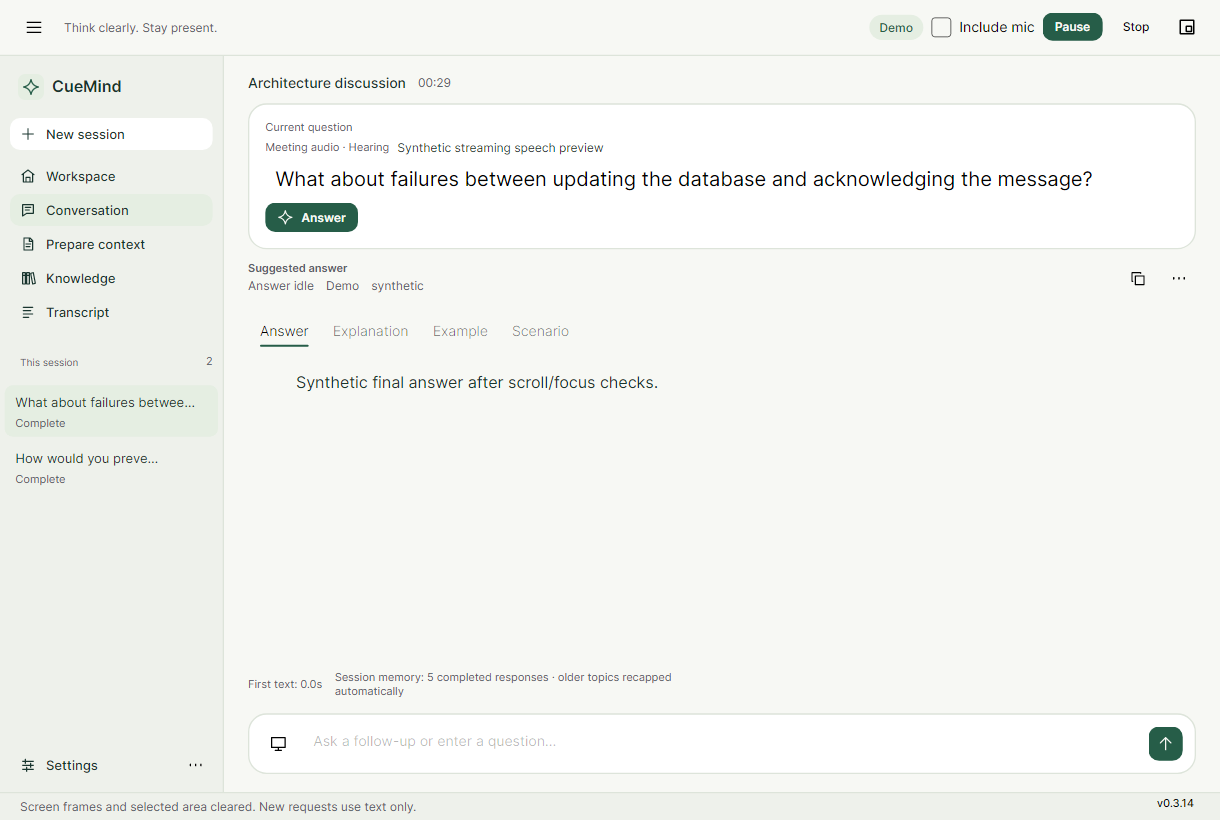
Keep session profiles and selected reference material close to the conversation.
Follow the transcript and explore answers, explanations, examples and scenarios.
Generate a meeting summary and explicitly export the results you want to keep.
From preparation to perspective
Use CueMind deliberately. Review suggestions, choose what to share and keep control of capture.
Add your topic and useful facts. Select reference documents and choose your answer and transcription providers.
Review the capture scope and destinations before starting. Or type a question without starting audio capture.
Explore a response in more detail, pause the discussion or prepare a summary. AI suggestions can be incorrect; use your judgment.
Visible controls. Deliberate sharing.
Opening CueMind does not start capture. You choose the audio and screen context, and approve destinations before sending content.
Use supported cloud providers with your own credentials, or Ollama for local answers. Cloud transcription can still send audio externally even when answers are local.
Understand what leaves your device →Start with the preview